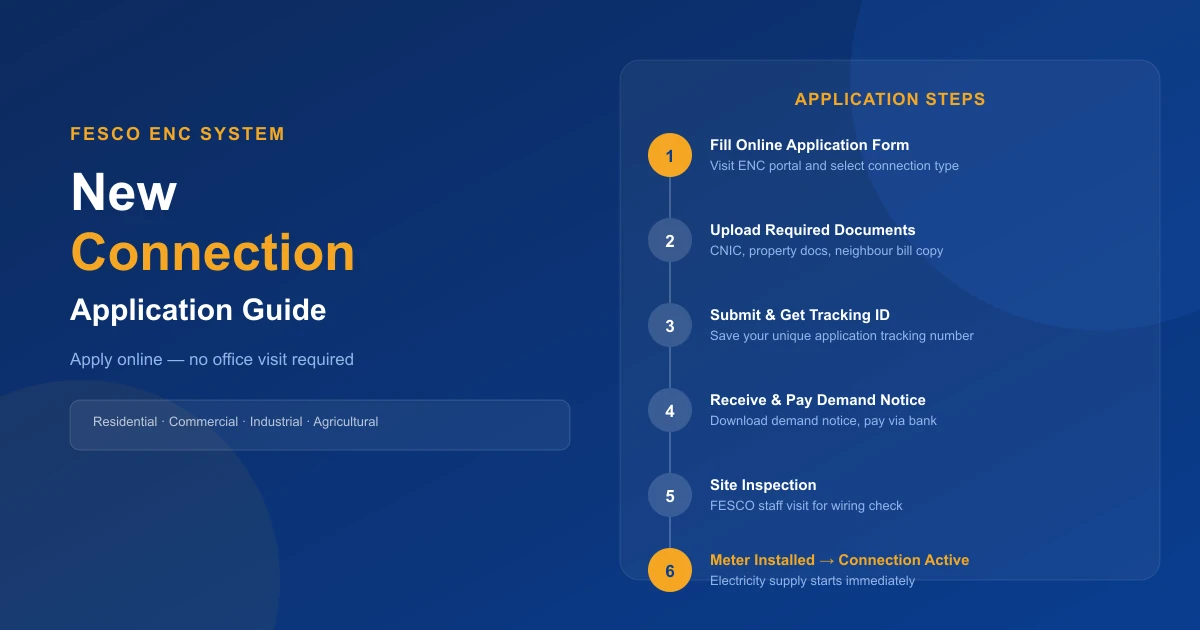
Getting a new electricity connection from FESCO is now easier with the ENC (Electricity New Connection) online system. You can apply for a new residential, commercial, agricultural, or industrial connection without visiting the office multiple times.
This guide explains the complete FESCO new connection application process, the required documents, the demand notice, fee payment, the tracking method, and common problems — all in simple English. Once your meter is installed, you can check your FESCO bill online anytime.
Connection Types
5 Types — Residential to Industrial
Apply Method
100% Online via ENC Portal
Process Steps
6 Steps to Active Connection
FESCO Helpline
111-000-118
What Is the FESCO New Connection ENC System?
The FESCO ENC (Electricity New Connection) system is an online service that allows users to apply for a new electricity connection. The system is managed under the official FESCO and PITC eServices platform.
Using the ENC system, consumers can:
- Apply for a new electricity meter online
- Upload required documents digitally
- Track application status in real-time
- Download the demand notice
- Check verification progress
- Save time and avoid repeated office visits
Types of FESCO New Connections
FESCO offers various types of electrical connections depending on the property and usage:
Residential Connection
Used for houses, flats, apartments, and personal residential properties. This is the most common type of connection applied for through the ENC system.
Commercial Connection
Used for shops, offices, restaurants, and business locations. Commercial connections may require additional documents such as a business registration certificate and NTN.
Industrial Connection
Used for factories, production units, and industrial buildings. Industrial connections require detailed load specifications and technical approval.
Agricultural Connection
Used for tube wells and farming-related electricity needs. These fall under Tariff K-1 and K-2 categories.
Temporary Connection
Used for construction sites, events, or temporary electricity usage for a defined period.
Documents Required for FESCO New Connection
Before applying online, keep scanned copies of the required documents ready. Blurry or incomplete documents will cause delays.
⚠️ Prepare Documents Before You Start
Use PDF or image files with smaller file sizes (under 2MB) for faster uploads. Make sure all document corners and text are clearly visible. Incomplete or blurry documents are the single most common reason for delays.
Basic Required Documents (All Connection Types)
- Copy of applicant's CNIC (front and back)
- Copy of property ownership documents (registry, allotment letter, or rent agreement)
- Neighbor's electricity bill copy (the bill of an adjacent connection)
- Attested wiring contractor test report
- Affidavit (if required by the sub-division)
- Passport-size photo of the applicant
Additional Documents for Commercial or Industrial Connections
- Business registration documents
- NTN certificate
- Partnership deed or company papers
- Site map or load details
How to Apply for FESCO New Connection Online — Step by Step
You can apply through the official ENC system. Before starting, make sure you have scanned copies of all required documents and a working mobile number.
Open the Official ENC Website
Visit the official FESCO ENC portal and click on the "Apply New Connection" option. The website works on both mobile phones and computers. Use a stable internet connection while filling out the application form. Read the instructions carefully before moving to the next step.
Select Connection Type
Choose the type of electricity connection you want to apply for — Residential, Commercial, Industrial, Agricultural, or Temporary. Selecting the correct category is important because the required documents, load limits, and processing time differ between types.
Fill the Application Form
Carefully enter all required information: full name, CNIC number, active mobile number, complete address, connection load details (kW required), neighbor's electricity bill reference number, and email address. Double-check all information before continuing — incorrect details cause application rejection or delays.
Upload Required Documents
Upload clear scanned copies or photos of all required documents: CNIC copy, property ownership documents, neighbor's electricity bill copy, wiring test report, passport-size photograph, and affidavit (if required).
Submit the Application and Save Your Tracking ID
After reviewing all information and uploaded documents, click the Submit button. After successful submission, the system will generate a tracking number or application ID. Save this immediately — take a screenshot of the confirmation page. You will need it to track verification progress, download the demand notice, and monitor meter installation.
Receive the Demand Notice and Pay the Fee
Once FESCO reviews and approves your application, they issue a Demand Notice — an official fee challan. Download it from the ENC portal using your application number. Pay through designated banks, mobile banking apps (HBL, UBL, MCB, Meezan), or in some cases JazzCash and EasyPaisa. Always get a payment receipt stamped by the bank.
How to Track FESCO New Connection Status
After applying, you can check your application status online through the ENC tracking system using your Tracking ID, CNIC number, and reference number (if issued).
Common Status Messages Explained
| Status | What It Means |
|---|---|
| Application Submitted | Your application has been received successfully |
| Documents Verified | Your documents have been checked and approved |
| Demand Notice Issued | Your fee challan is ready for payment |
| Payment Pending | Connection fee has not been paid or verified yet |
| Meter Installation in Process | FESCO staff are preparing to install the meter |
| Connection Activated | Your electricity connection is now active |
What Is a FESCO Demand Notice?
A demand notice is an official fee challan issued after your application is approved. It contains the connection charges that must be paid before meter installation.
What Is Included in the Demand Notice?
- Meter charges
- Security fee (refundable security deposit)
- Service connection charges
- Installation charges
- Applicable taxes and duties
✅ Download and Print Your Demand Notice
You can download the demand notice online from the ENC portal using your application number. Always keep a printed copy for your records. Pay only at authorized bank branches or digital channels listed on the notice.
Meter Installation Process After Payment
After you pay the FESCO demand notice fee, FESCO starts the meter installation process — verifying your payment and documents before installing the electricity meter.
Site Verification
Before installing the meter, FESCO staff will visit your property for inspection. They check:
- Property address (matches application)
- Electric wiring condition (properly completed)
- Pole distance and line connection feasibility
- Load requirements (matches applied load)
🔴 Complete Your Wiring Before the Inspection
FESCO staff will check your wiring during the site visit. If your internal wiring is incomplete, the installation will be delayed. Make sure a licensed wiring contractor has completed all internal wiring before the inspection visit.
Meter Installation and Connection Activation
After approval and verification, FESCO installs the electricity meter — connecting wires and cables, checking the meter reading and setup, and completing technical testing. Once activated:
- Your meter becomes operational
- The electricity supply starts working
- Future monthly bills are generated automatically
Check the meter carefully after activation and report any issues immediately by calling 111-000-118.
FESCO New Connection Processing Time
A normal residential FESCO connection usually takes a few weeks if all documents are complete and correct. The process includes document verification, site inspection, demand notice issuance, payment confirmation, and meter installation. Applications with complete information are processed faster.
Common Reasons for Delays
- Incomplete or blurry documents
- Incorrect information in the application
- Pending verification process
- Area load issues or technical problems
- Wiring not completed before the site inspection
Common Problems During FESCO ENC Application
| Problem | Cause | Solution |
|---|---|---|
| Documents not uploading | File size too large | Compress to under 2MB, use PDF |
| Wrong CNIC / mobile | Data entry error | Double-check before submitting |
| Demand notice not showing | Verification pending | Wait 7 working days, then call 111-000-118 |
| Application rejected | Incomplete info or docs | Correct the issue and re-apply |
Benefits of Applying Through the ENC System
- Apply from home — no need to stand in long office lines
- Fewer office visits — document management and submission is all online
- Real-time tracking — monitor every stage using your tracking ID
- Transparent process — see exactly where your application stands at all times
Quick Start Checklist
Before you open the ENC portal, have these ready:
- ✅ Scanned CNIC (front and back)
- ✅ Property ownership document (registry / allotment letter)
- ✅ Neighbor's electricity bill copy (any adjacent connection)
- ✅ Wiring contractor test report
- ✅ Passport-size photograph
- ✅ Active mobile number for OTP and updates
- ✅ Internal wiring completed by a licensed contractor
What Happens After Your Connection Is Activated?
Once your FESCO connection is activated and your first bill is generated, you can:
- Check your bill by reference number using your new 14-digit Reference Number
- Download your FESCO duplicate bill at any time for payment or record-keeping
- Understand all charges and taxes on your bill to make sense of what you're paying
- Learn about FESCO peak hours timing to reduce your electricity costs
- If the connection was applied for under a builder, seller, or previous applicant's name, see our guide on how to change the name on your electricity bill
You can also check your FESCO bill instantly on our homepage anytime after your connection is active.
Frequently Asked Questions
Can I Apply for a New FESCO Connection Online?
Yes, you can apply through the official ENC online system. The portal accepts all connection types — residential, commercial, industrial, and agricultural.
How Long Does a New FESCO Connection Take?
The time depends on verification, category, and area conditions. Residential connections typically take a few weeks with complete documentation.
Can I Track My Application Online?
Yes, the ENC system provides online application tracking using your Tracking ID.
What Happens After Paying the Demand Notice?
FESCO verifies the payment and starts the meter installation process, which includes site inspection and technical testing.
Is the ENC System Available for Commercial Connections?
Yes, residential, commercial, industrial, and agricultural connections are all supported through the ENC system.
Can I Apply for a FESCO Connection Without Visiting the Office?
Yes. The ENC system allows you to complete most of the process online — you may only need a physical visit for the site inspection, which FESCO staff will schedule.
Conclusion
The FESCO New Connection ENC system has made applying for a new electricity meter much easier. You can submit your application online, upload documents, track your status, and download the demand notice without visiting offices repeatedly.
Always enter correct information, upload clear documents, and keep your tracking number safe to avoid delays in the approval process. Once your connection is activated, start using our free FESCO bill check tool to monitor your monthly bills.
Related Guides
- Check FESCO Bill by Reference Number Online
- FESCO Duplicate Bill — Download & Print Free
- FESCO Bill Taxes Explained — GST, FPA & All Charges
- FESCO Peak Hours Timing — Save Money on Electricity
- FESCO Bill Complaint Online — File & Track Easily
- How to Change Name on Electricity Bill in Pakistan
- FESCO Bill Calculator — Estimate Your Bill Free
- FESCO Online Bill Check — Homepage

Shahzad Mahmood
Sub-Divisional Officer (SDO), FESCO
Shahzad Mahmood is a Sub-Divisional Officer (SDO) at Faisalabad Electric Supply Company (FESCO) with hands-on experience in electricity distribution, metering, and consumer billing. He reviews the guides on this site to keep the bill-checking steps, tariffs, and complaint procedures accurate and up to date.
View LinkedIn Profile